
$76.49
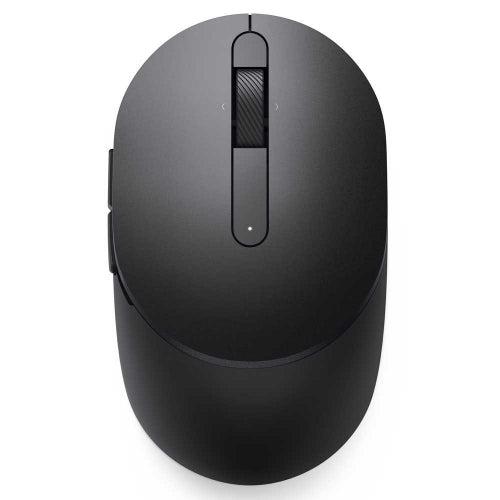
Dell Mobile Pro Wireless Mouse (MS5120W)
Black



FREE Delivery Nov 12 - 17
Dell Mobile Pro Wireless Mouse (MS5120W)
Black
$76.49
FREE Delivery Nov 12 - 17
Trade in
- Ship for Free
- Data Wiped
- Get Paid Fast
Professionally refurbished and shipped by
- Connect seamlessly
- The dual-mode connectivity incorporates a 2.4GHz wireless and a Bluetooth 5.0 connection so you can pair and connect to almost any PC via your preferred mode.
- Easy Pairing
- Pair your mouse to your Windows laptop via Bluetooth instantly using Microsoft Swift Pairi, so you do not need to configure in Windows settings every time. This mouse is also compatible with a variety of operating systems, including Windows, Mac, Chrome, Linux and Android.
- Built to last
- Work for up to 36 monthsi on a single battery — that's three times longer than previous-generation models — and forget about having to recharge daily, weekly or even monthly. This lets you get on with your tasks smoothly without having to be concerned with battery replacements.
- Simply reliable
- Should your mouse be faulty within the three-year warranty, Dell’s Advanced Exchange Service ships you a replacement unit the next business day. Rigorous testing across Dell systems ensures your mouse is fully reliable and primed, making deployment easier across hundreds of Dell systems.
- Precise tracking
- A 1600 DPI sensor ensures this Dell Mobile Pro Wireless Mouse - MS5120W handles high-resolution screens easily. Its optical sensor offers accurate tracking and is ideal on most desk surfaces.
- Quick access
- Intuitively positioned shortcut buttons allow easy navigation across web pages and applications. Browse back and forth efficiently between pages onscreen effortlessly.
- Device Type
- Mouse
- Width
- 6.15 cm | Depth
- Colour
- Black
- Connectivity Technology
- Wireless
- Interface
- 2.4 GHz, Bluetooth 5.0
- Movement Detection Technology
- Optical
- Buttons Qty
- 7
- Movement Resolution
- 1600 dpi
- Features
- Swift Pair
- Battery Type
- AA type
- Run Time (Up To)
- 36 months
- Software Included
- Dell Peripheral Manager (Windows only)
- OS Required
- 2.4Ghz (- Windows 7, Windows 8.1 and 10; Mac; Linux (Red Hat Enterprise 8.0 /Ubuntu 18.4); Chrome; Android OS) | Bluetooth (- Windows 8.1 and 10; Mac; Linux (Red Hat Enterprise 8.0 /Ubuntu 18.4); Chrome; Android OS)
- Dell Peripheral Manager
- Windows 7, Windows 8.1, 10 or later
Dell Mobile Pro Wireless Mouse (MS5120W)
Black
$76.49
FREE Delivery Nov 12 - 17
Premium Refurbished.
Trusted Quality.
4.7out of /5
based on 70,000 reviews
Trustpilot

Save up to 70%
12 Months Warranty
Quality Tested by Experts
Risk-free 30-Day Trial
Save up to 90% CO2 vs new
Buy Refurbished Dell Mobile Pro Wireless Mouse (MS5120W) in United States
Looking to buy an affordable Dell Mobile Pro Wireless Mouse (MS5120W)? Find great deals for unlocked, used Dell Mobile Pro Wireless Mouse (MS5120W) at Reebelo. All our second hand Dell Mobile Pro Wireless Mouse (MS5120W) devices are refurbished, 100% functional and sold by trustworthy American vendors. Enjoy up to 12 months warranty, a 30-day return policy & free delivery. No matter if you are looking for a new Dell Mobile Pro Wireless Mouse (MS5120W) or a refurbished Dell Mobile Pro Wireless Mouse (MS5120W) - find the best prices at Reebelo!
 English


© Reebelo United States | EIN: 88-3215530
Free Shipping to United States30-Day Returns in United States
100% Secure Payments


